Configuration
Pre-Requisits
To fully utilize Vulnerability Intelligence, ensure the following components are in place:
- An active API key from the NVD
- Asset data ingested through the AME Observable Engine
- Vulnerability data indexed in Splunk (with CVEs and asset identifiers such as IP or hostname)
- Optionally, third-party ticketing system integration (e.g., ServiceNow)
AME makes extensive use of the Observables Framework to manage vulnerabilities and risks across organizational assets. Customers may also use Ticketing Integration for escalation workflows.
-
Leverage the Observable Framework to ingest organizational assets. Use Observable Groups to define logical units such as departments or PCI zones. Tag each asset's criticality to enhance integration with the Risk Framework and improve prioritization.
-
Ensure your Vulnerability Data is available in Splunk
- AME does not have any prescription on the data source, save for the presence of the identified vulnerability (CVE) as well as the identified asset (hostname, ip, etc)
- Feeds can be from your internal or external vulnerability scanners, as long as the data is present in Splunk and the Vulnerability and Asset fields are present
- Build a search to target your vulnerability data
- A simple search to bring back the asset and vulnerability data
- You can support multiple vulnerability sources using multiple searches
- Ingest the results to the Vulnerability Management Engine via the AME Realization Alert Action to start tracking your vulnerabilities
- Build a realization rule to turn Vulnerability Data into actionable AME Events
- (Optionally) Integrate with your Ticketing System to track third-party remediation efforts
-
Build any Exclusion rules to track exceptions and acceptances in your environment
-
Configure scheduled vulnerability reporting
- Create and automate structured reports per department, business unit, PCI scope or reporting group
- Detailed guide: Vulnerability Intelligence Reporting
- Monitor remediation progress and key metrics
- Real-time dashboards, realization trends, and advanced reporting commands
- See: Vulnerability Intelligence Reporting and command
amevulnintrealizations
Implementation Guide
1. Ingest your Asset data via the Observable Framework
Refer to the dedicated Observable Framework page for complete guidance on asset ingestion.
Properly ingested assets allow AME to accurately map vulnerabilities to the right hosts, endpoints, or identities.
Define Observable Groups (such as departments, business units, or PCI cardholder-data environments) to enable segmented, context-aware vulnerability management.
For optimal prioritization, assign realistic criticality ratings to your assets during import — this is required for full integration with the Risk Framework.
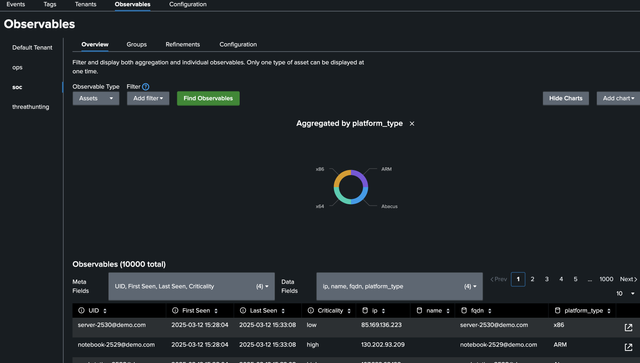
Example of a successful asset import:
2. Ensure vulnerability detection data is available in Splunk
Vulnerability data sources vary widely across vendors and environments. Typical sources include:
- On-premises scanners (network, authenticated/credentialed, agent-based…)
- Cloud-native or external-facing vulnerability scanners
- Curated exposure feeds from security service providers or MSSPs
- Any feed that reports CVEs together with current status and asset identifiers
These sources usually run on a recurring schedule (daily, weekly, etc.) and report active or newly discovered vulnerabilities.
To be ingested by AME’s Vulnerability Intelligence engine, the data must be indexed in Splunk and your search results must include these exact field names (case-sensitive):
cve— the CVE identifier (e.g.,CVE-2025-21311)status—activeorfixedvalue— the asset identifier exactly matching a field in your Observable data
(most commonly IP address, hostname, or FQDN — this is the value AME uses for correlation)
Optional but recommended fields:
first_seen— timestamp of first detectionlast_seen— timestamp of most recent detection
Important: The field value is mandatory.
Example: If your Observables use the field ip for matching, your search must output the affected asset’s IP address in a column named exactly value.
3. Create a recurring Saved Search to ingest Realizations
Once your vulnerability data is available in Splunk with the required fields, create a Saved Search (or Scheduled Alert) that targets this data.
- Write a Splunk search that returns the fields listed above (
cve,status,value, and optionallyfirst_seen/last_seen). - Save the search as a Scheduled Alert with an appropriate execution frequency (e.g., daily or matching your scanner cadence).
- Add the AME Realization Alert Action to send matching results to the Vulnerability Intelligence engine.
Alert Action Configuration
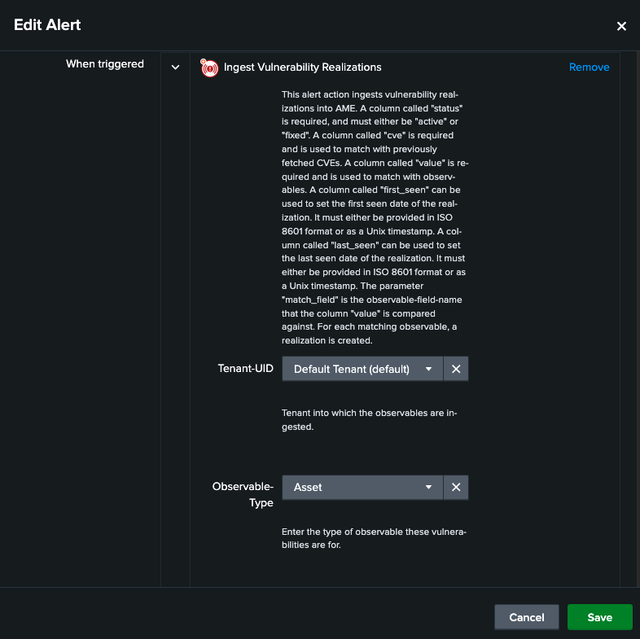
Key settings in the Alert Action:
- Select the target tenant
- Choose the correct Observable type (e.g., Asset)
- Specify the match_field (the Observable field that corresponds to your
value— typicallyip,hostname, etc.)
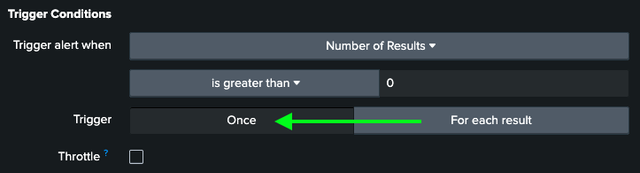
For best performance, enable Trigger Once so the action processes all results in a single call:
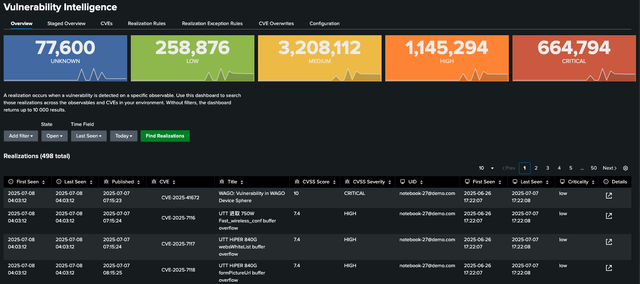
After the search executes successfully, new Realizations will appear in the Vulnerability Intelligence section of the AME UI:
You can now proceed to define Realization Rules to turn these detections into actionable AME Events.
4. Create Realization Rules to Generate Actionable AME Events
Realization Rules act as the core logic layer in Vulnerability Intelligence: they evaluate incoming Realizations and decide whether (and how) to create AME Events, apply risk modifiers, or trigger other actions.
Realization Rules are evaluated once per day by default (configurable per tenant).
Key Configuration Options in a Realization Rule
-
Matching Conditions
Define filters to select which Realizations trigger the rule (e.g.,CVSS Severity = Critical). -
Grouping
Control how events are aggregated. Grouping by one or more fields creates a single AME Event for related Realizations.
Common patterns include:- Group by CVE + Observable Group → One event per CVE per department/business unit/PCI zone
- Group by CVE → One event per CVE across the entire environment
- Group by Observable → One event per affected asset (regardless of CVE count)
Example used here: Group by Observable Group + CVE → Creates one AME Event per CVE within each department or logical group.
-
Risk Modifier
Optionally apply a risk score adjustment to the affected Observable(s) when the rule matches (e.g., increase risk for critical vulnerabilities). -
Notable Fields
Map any fields from the realization/event context into the new AME Event (title, description, custom fields, etc.) using Jinja2.
SeeRendering Contextfor the full list of available variables. These fields will be visible under the event'sNotable Fieldstab.
Example Use Case: Track Critical Vulnerabilities
In this example, we create a rule that generates AME Events only for critical vulnerabilities as soon as they are processed by the Realization Engine.
We recommend defining a dedicated AME Event Template (under Tenant Settings) to visually distinguish Vulnerability Intelligence events from other types in your environment.

Example Use Case: Track Windows Client Vulnerabilities
In this example, we have created a rule that generates AME Events only for Windows Client vulnerabilities as soon as they are processed by the Realization Engine.
Beside the dedicated AME Event Template (under Tenant Settings) we have also added Templated Notable Fields which will be visible under the Notable Fields Tab of the event

Important Notes
- Multiple Realization Rules can match the same Realization → This results in multiple AME Events and corresponding Risk Events for the same vulnerability/asset combination.
- Once created, these AME Events are managed using standard AME workflows (assignment, status changes, SLA tracking, notifications, ticketing, etc.).
After the Realization Engine runs (once daily), matching events appear in your AME Event list:
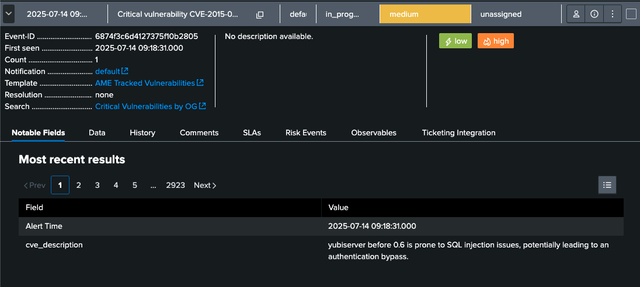
From here, continue with standard AME processes: assign owners, link tickets (ServiceNow/Jira), apply SLAs, or escalate as needed.
5. Define Exclusion Rules for Accepted or Exempted Risks
In many environments, certain vulnerabilities must be temporarily or permanently excluded from active tracking — often for valid business or operational reasons (e.g., system availability, accepted risk, or compensating controls). These exclusions require careful definition, documentation, and periodic review.
Exclusion Rules in AME Vulnerability Intelligence allow you to:
- Define precise conditions under which Realizations (vulnerability instances) are excluded from generating AME Events
- Continue reporting on these excluded vulnerabilities for transparency, audit, and compliance purposes
- Optionally require approval workflows (e.g., risk officer sign-off) via comments or linked tickets
Excluded Realizations are still tracked in the system but will not create new AME Events, helping you focus remediation efforts on truly actionable risks.
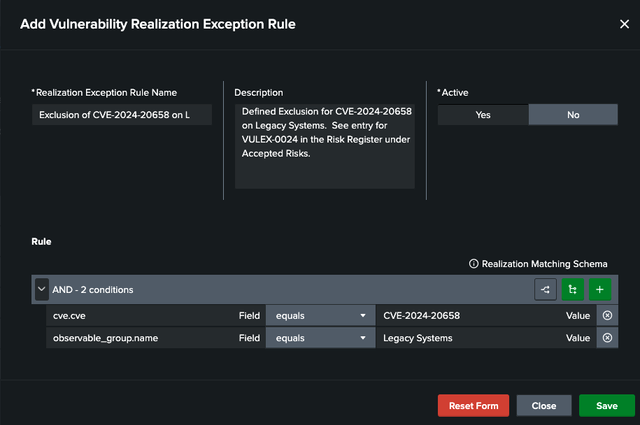
Example: Exclude a Vulnerability for Legacy Systems
In the following example, we create an exclusion rule that suppresses AME Events for a specific CVE across all assets in the Legacy Systems Observable Group:
Best Practices
- Document the business justification clearly in the rule description or comments
- Set an expiration date or review reminder where appropriate
- Regularly review all active exclusions (e.g., quarterly) to ensure they remain valid
- Use exclusion rules sparingly — they should represent deliberate, approved risk acceptance, not a workaround for poor remediation
Once saved, these rules are automatically applied during the daily Realization Engine processing cycle.
6. Configure Scheduled Vulnerability Reporting
After vulnerabilities are being ingested, enriched, prioritized and (optionally) escalated via ticketing, the next essential part of a mature vulnerability management process is structured, recurring visibility for stakeholders, management, compliance and audit teams.
AME Vulnerability Intelligence provides flexible, highly customizable scheduled reporting with the following key capabilities:
- Reports scoped to specific Observable Groups or Reporting Groups (departments, business units, PCI cardholder data environments, criticality levels…)
- Custom branding (upload your company logo and define color scheme)
- Select which CVE fields, Observable fields and Observable Group fields should be included in tables
- Flexible filtering (status, age, lookback period…)
- Markdown sections for commentary/context + page breaks for printable reports
- Automatic email distribution to individuals or reporting groups on a cron-based schedule
Quick Configuration Steps
- Go to Vulnerability Intelligence → Reporting in the AME interface
- Click Add Vulnerability Report
- Set recipient(s), cron schedule, branding, filters and activation status
- Add and configure report sections:
- Markdown Content (free text explanations)
- Page Break (for printing)
- Observable Group Summary (the actual vulnerability table)
- Save and enable the report
For complete documentation including all available options, screenshots and best-practice examples, please refer to the dedicated page:
→ Vulnerability Intelligence Reporting
Most organizations consider automated stakeholder reporting one of the highest-value features of the Vulnerability Intelligence module — we recommend configuring at least one or two pilot reports early in your deployment.
7. Monitor Remediation Progress and Key Metrics
With ingestion, processing, exclusions, and scheduled reporting configured, continuous monitoring completes the vulnerability management cycle.
AME offers the following ways to track remediation status and performance:
Real-time Visibility
-
Realizations Dashboard
In the Vulnerability Intelligence section — shows active/fixed/staged counts, trends, top CVEs, affected assets. -
General AME Reports
Under main Reports menu — includes realization volume, engine performance, SLA indicators.
Detailed Analysis
Use the SPL command for daily engine activity:
| amevulnintrealizations
→ Full documentation:
amevulnintrealizations Command Reference
Recommended Long-term Tracking
Scheduled vulnerability reports (step 6) are usually the most powerful tool for:
- Historical trends & aging analysis
- SLA compliance
- Exception overview
- Management / audit reporting
Quick tip: Prioritize scheduled reports for leadership and compliance — dashboards are great for daily ops.
Future releases will significantly expand built-in dashboard capabilities.
Advanced Configuration
Staged Realizations
To fully leverage Vulnerability Intelligence, ensure all relevant assets are ingested into the Observable Framework.
When the Realization Engine detects a vulnerability on an asset that does not match any existing Observable, the realization is placed in a temporary Staged state. This is a valuable indicator of potential blind spots or unmanaged hosts in your asset inventory.
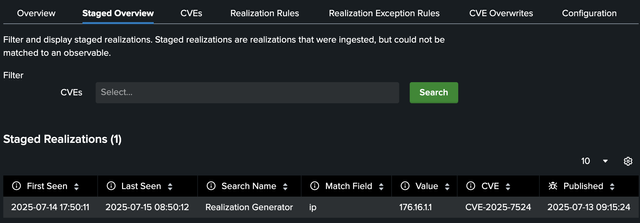
Recommended action:
- Review staged realizations regularly in the Vulnerability Intelligence → Staged view.
- Augment your Observable data by adding the missing asset(s) (IP, hostname, etc.).
- Staged items are automatically removed after the tenant-configured Staged retention days period (see below).
These staged realizations often highlight real security gaps that standard asset discovery or CMDB processes may have missed. Feeding them back into your asset management and discovery workflows is strongly recommended.
Overwriting CVE Metadata
For advanced use cases, you can override specific metadata fields from the NVD for individual CVEs. This is useful when local compensating controls, mitigations, or internal assessments change the effective risk profile of a vulnerability.
Example: If a secondary workaround has been implemented that eliminates exploitability in your environment, you can explicitly set the Exploitable field to false.
Create an Overwrite Rule to match a CVE (or CVE pattern) and replace any of the following fields:
Overwritable fields:
- Title
- CNA
- Description
- CVSSVersion
- CVSSScore
- CVSSSeverity
- CVSSVector
- CVSSSource
- Exploitable
- EPSS
- CWE
- CAPEC
- Vendor
- Products
Tenant Configuration Options
The following settings are available per tenant under Vulnerability Intelligence configuration:
Auto-fix grace period
Vulnerabilities are not always explicitly reported as fixed by scanners.
Set a grace period (in days) after which a vulnerability that is no longer reported will be automatically marked as fixed.
Note: Continue tracking asset disappearance via the Observable Framework to avoid blind spots.
Fixed retention days
Fixed realizations are retained in the KV store for reporting purposes and archived to a long-term index.
This setting controls how many days fixed realizations are kept before automatic removal.
Staged retention days
Defines how long unmatched (staged) realizations remain visible in the UI before being automatically deleted.
Tracking future days
Allows forward-looking evaluation of realization rules based on vulnerability age.
This setting determines how many days into the future the engine should project metrics (useful for aging analysis and maturing vulnerability tracking).
Auto-Resolve status
When all active Risk Events created by the Realization Engine for a given AME Event are remediated, AME can automatically close the parent Event using the selected status.
Drilldowns
Drilldowns provide quick links to third-party systems (e.g., vulnerability management platforms).
They require the source field to be set during realization ingestion.
Define a Jinja2 template in the rendering context that generates the URL:
{% for risk_event in risk_events %}
  {{ ame_event_context_realization_to_drilldown(risk_event.realization) }}
{% endfor %}
For reports, configure an Observable field to serve as clickable link text — the report engine automatically loads the corresponding drilldown URL.
Global Configuration Options
Global settings for the Vulnerability Intelligence engine are found under the Vulnerability Config tab on the main AME Configuration page.
AME automatically fetches authoritative CVE metadata from the NIST NVD API once per day.
See System Configurations for instructions how to configure the connection.
Next Steps
- Configure Reporting Vulnerability Intelligence Reporting