Configuration
This page covers how to configure observable settings and use lookups to integrate observable data with Splunk searches.
Configure Observable Settings
To prevent stale and decommissioned assets from taking up space in your collections you can setup aging rules that will age-out observables if not seen for a period of time. Manage retention in the Configuration tab
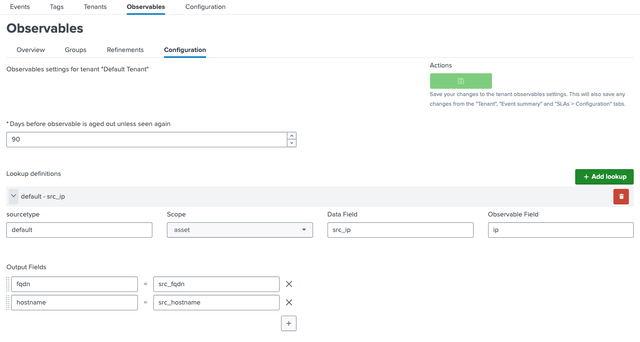
| Setting | Default | Description |
|---|---|---|
| Days Before Age-Out | 90 | Data expires after 90 days unless re-detected |
Adjust this to balance storage and relevance.
Use Lookups
The observable data can be used with standard search tooling by means of lookups. AME presents your observable collections as lookups, that can be used with inputlookup and lookup commands.
The naming scheme for observable lookups is ame_<tenant>_observable_<observable_type>
Following lookup definitions will be created automatically for the default tenant:
- Assets:
ame_default_observable_assets - Identities:
ame_default_observable_identities
Supported meta fields for both observable types are as follows:
_keytenant_uidtypeuidfirst_seenlast_seenobservable_group_namecriticalityrisk
Data fields can be accessed directly.
Example search
<base search> | lookup ame_default_observable_assets ip as src_ip OUTPUT hostname as host fqdn as host_fqdn observable_group_name as group
Lookup definitions will be created and updated automatically when an asset or identity collection is created or modified. This ensures, that all fields are usable in lookups. Updates run daily.
Automatic Lookups
For automatic lookups use the configuration tab to configure input field mappings. The UI will ensure, that the correct configuration is created.
For automatic lookups, replication will be enabled by AME. See Splunk Docs for more details
Acceleration
To speed up lookups and improve performance of activities using observables (e.g. ingestion, grouping, refinements), you can enable acceleration on the underlying KV Store collections. As AME does not enforce any schema for your observables, acceleration needs to be configured according to your data model.
AME ships and creates for additional tenants the following default acceleration configurations that can be used as a starting point:
[ame_<tenant_uid>_observable_assets]
accelerated_fields.uid = {"uid": 1}
accelerated_fields.ip = {"ip": 1}
accelerated_fields.name = {"name": 1}
accelerated_fields.fqdn = {"fqdn": 1}

[ame_<tenant_uid>_observable_identities]
accelerated_fields.uid = {"uid": 1}
accelerated_fields.first_name = {"first_name": 1}
accelerated_fields.last_name = {"last_name": 1}
accelerated_fields.username = {"username": 1}
accelerated_fields.email = {"email": 1}
accelerated_fields.user_id = {"user_id": 1}
It is recommended to review and adjust these settings based on your actual observable data fields and usage patterns.
Next Steps
- Configure templates to map asset and identity information to alert results (see Templates)
- Use Observables to manage Risks (see Risk Scoring)