Observable Groups
Organize observables into groups via the Groups tab to categorize and enrich data based on common attributes. Observable groups allow you to create additional context for your observables using Names and Descriptions.
Example Use-Cases
- Add all assets that exist in a specific region to a group. E.g.: Add all computing resources in Germany to the DE Asset Group
- Set groups for different PCI network zones: For example PCI customers can add groups for Cardholder Data Environment (CDE) zones, DMZ, Corporate and Wireless zones
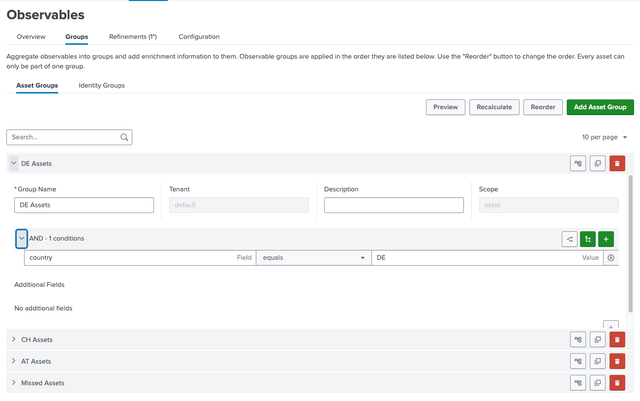
How to Create a Group
- Go to
Observables>Groups. - Click
Add Asset GrouporAdd Identity Group. - Define:
- Name: e.g.,
DE Assets. - Condition: e.g.,
country = "DE"
- Name: e.g.,
- Define a "catch-all" rule for all others
- Use
Reorderto set priority
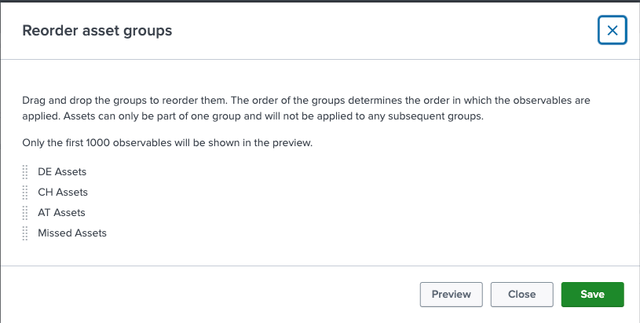
- Use
Previewto check the resulting grouping. Note that only the first 1000 assets are shown.
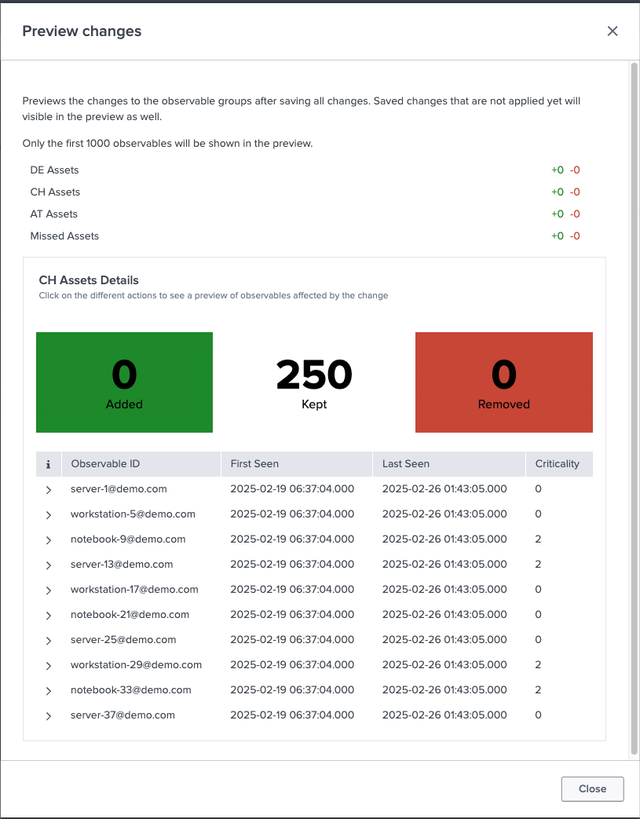
Recalculatefor immediate updates.
Groups update daily or on recalculation, appearing as Aggregated by observable-group in the UI. For example, grouping assets by country (e.g., USA, Germany) helps organize data for regional analysis.
Example
Group five hosts across three countries by the country field.
- Asset Data for Hosts:
| uid | host | country |
|---|---|---|
host1 | host1 | DE |
host2 | host2 | DE |
host3 | host3 | CH |
host4 | host4 | AT |
host5 | host5 | empty |
- Output after group assignment:
| observable_group | uid | host | country |
|---|---|---|---|
| DE Assets | host1 | host1 | DE |
| DE Assets | host2 | host2 | DE |
| CH Assets | host3 | host3 | CH |
| AT Assets | host4 | host4 | AT |
| Missed Assets | host5 | host5 | empty |
Next Steps
- Create Reporting Groups - Group observable groups for reporting
- Configure Settings - Set up age-out rules and lookups