Ingestion
Set up Observables by creating a Splunk search and Alert Action to ingest data into AME. This page covers how to collect observable data and configure the ingestion process.
Splunk Search
Write a Splunk search to gather asset or identity data, including required and optional fields for ingestion into AME Observables. Trigger this search with the Ingest Observables Alert Action.
Required and Optional Fields
| Field | Required? | Description |
|---|---|---|
uid | Yes | Unique identifier (e.g., server01, user123) to merge data from multiple searches |
criticality | No | Criticality level (e.g., high, low) to influence handling in AME; defaults to medium if unset |
observable_state | No | State of the observable: existing (default) or removed (deletes it, bypassing age-out) |
| Other Fields | No | Custom data fields (e.g., ip, name, fqdn); only use letters, numbers, and underscores |
index=assetdata sourcetype=cmdb
| eval uid=coalesce(hostname, fqdn, ip)
| table uid hostname ip fqdn
Set this search to trigger the Ingest Observables Alert Action, targeting a tenant's KV Store collection.
Alert Action
In Splunk, add the Ingest Observables Alert Action to your search and configure it:
| Field | Description |
|---|---|
Tenant-UID | Choose the tenant (e.g., Default Tenant) to store data |
Observable-Type | Select Asset or Identity to categorize the data |
Confidence | Set a value (0–100) to prioritize this source; higher values overwrite existing data (see below) |
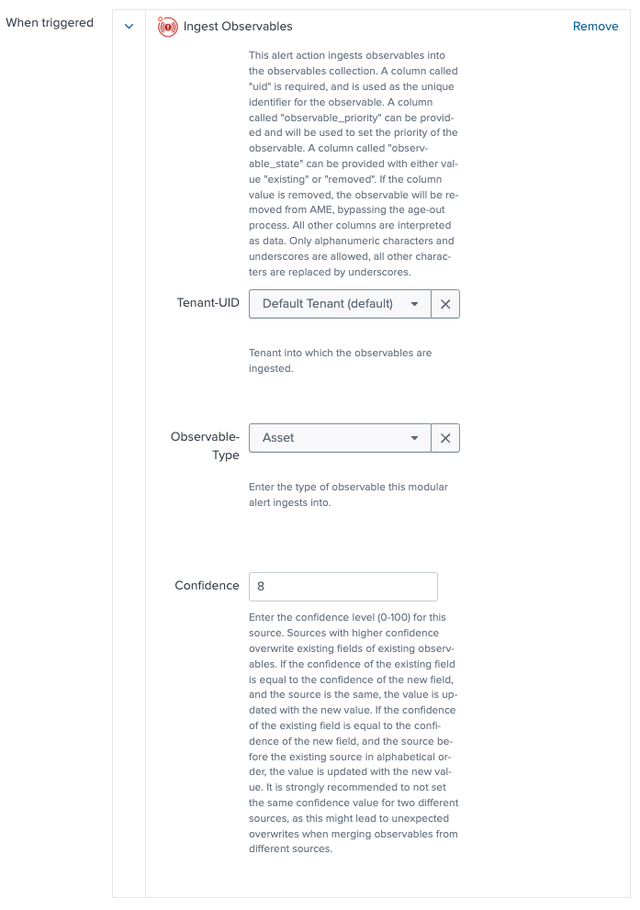
Confidence Levels Explained
Confidence levels allow you to manage conflicts and merge attributes on observables when you have assets or identities appearing in multiple sources. It is not uncommon for an environment to have; CMDB data, LDAP data as well as inventory from vulnerability scanners in Splunk. Using confidence levels you can merge the attributes returned by these lists for an observable, merging the attributes accordingly.
- Range: 0–100 (e.g., 90 for high-confidence sources).
- Behavior: Higher confidence overwrites existing fields. If confidence matches, the new value wins if the source name alphabetically follows the existing one (e.g.,
SourceBbeatsSourceA).
Example
- Results for one asset from three different sources:
| Search Name | UID | Host | Country | OS | Memory | CPU Cores | IP | Confidence |
|---|---|---|---|---|---|---|---|---|
| Network Scanner | server01 | server01 | USA | (empty) | (empty) | (empty) | 192.168.1.10 | 90 |
| CMDB | server01 | server01 | (empty) | Windows 11 | 16GB | 8 | 192.168.1.11 | 70 |
| Hardware Monitor | server01 | server01 | Canada | Windows 10 | 32GB | 4 | (empty) | 50 |
- Merged Results for Asset
uid = "server01":
| Field | Value | Confidence | Source | Origin Type |
|---|---|---|---|---|
uid | server01 | 90 | Network Scanner | search |
host | server01 | 90 | Network Scanner | search |
country | USA | 90 | Network Scanner | search |
os | Windows 11 | 70 | CMDB | search |
memory | 16GB | 70 | CMDB | search |
cpu_cores | 8 | 70 | CMDB | search |
ip | 192.168.1.10 | 90 | Network Scanner | search |
criticality | high | 90 | Network Scanner | search |
observable_state | existing | 90 | Network Scanner | search |
Avoid identical confidence values across sources to prevent unexpected overwrites.
Next Steps
- Refine Observables - Transform your data post-ingestion
- Group Observables - Organize observables into logical groups
- Configure Settings - Set up age-out rules and lookups