Refinements
Use the Refinements tab in AME's Observables menu to tweak ingested data with refinement rules.
Refinement rules allow you to transform your data post ingestion, using an easy to use visual interface.
Example Use-Case
Set a normalized platform for your operating systems. Your analysts are interested on whether a computing resource is running some version of Windows, or some flavour of Unix, such as AIX, HPUX, OpenBSD etc. For your purposes you want to categorise these into either: Windows or Unix
The refinement functionality is intended to transform and contextualize your observables post collection. For pre-ingestion normalization, refer to the Ingestion section, where you can use the Splunk command palette, including eval to perform transformations on your data.
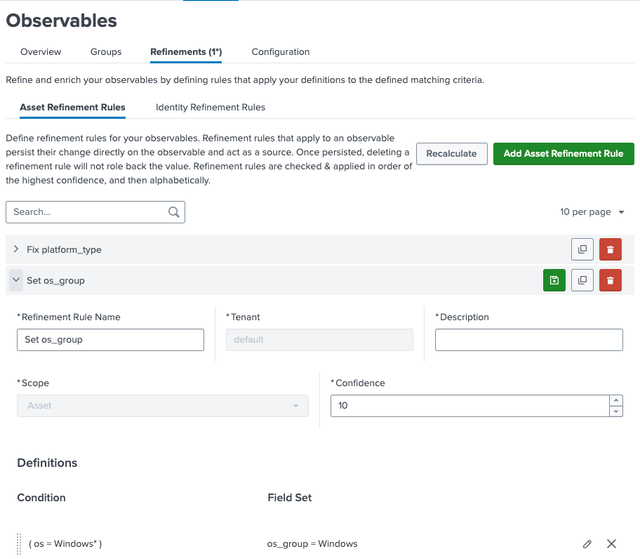
How to Add a Refinement Rule
- Go to
Observables>Refinements. - Click
Add Asset Refinement RuleorAdd Identity Refinement Rule. - Fill in:
| Field | Description | Example |
|---|---|---|
| Name | Unique rule name. | Standardize OS |
| Tenant | Target tenant. | default |
| Description | Optional purpose note. | Set OS Version |
| Scope | Asset or Identity. | Asset |
| Confidence | Priority (higher evaluated first). | 95 |
| Condition | Logical filter (e.g., os matches Windows Versions) | {{os = "Windows NT 10.0" OR os = "Windows NT 10 Build 22621"}} |
| Field Set | New field value to apply. | os = Windows 11 |
Example
Standardize OS values for assets where os is Windows NT 10.0 or Windows NT 10 Build 22621 to Windows 11.
- Input values:
| uid | host | os | ip | confidence | source | origin_type |
|---|---|---|---|---|---|---|
host1 | host1 | Windows NT 10 Build 22621 | 192.168.1.20 | 85 | OS Scanner | search |
host2 | host2 | Windows NT 10.0 | 192.168.1.21 | 60 | Legacy System | search |
- Refined Results for Hosts:
| uid | host | os | ip | source | origin_type |
|---|---|---|---|---|---|
host1 | host1 | Windows 11 | 192.168.1.20 | Standardize OS | refinement |
host2 | host2 | Windows 11 | 192.168.1.21 | Standardize OS | refinement |
- Click
Recalculateto apply rules instantly.
Next Steps
- Group Observables - Organize observables into logical groups
- Create Reporting Groups - Group observable groups for reporting
- Configure Settings - Set up age-out rules and lookups